PageForm
A drag-and-drop form builder for non-technical teams — build, publish, and track forms without writing code.
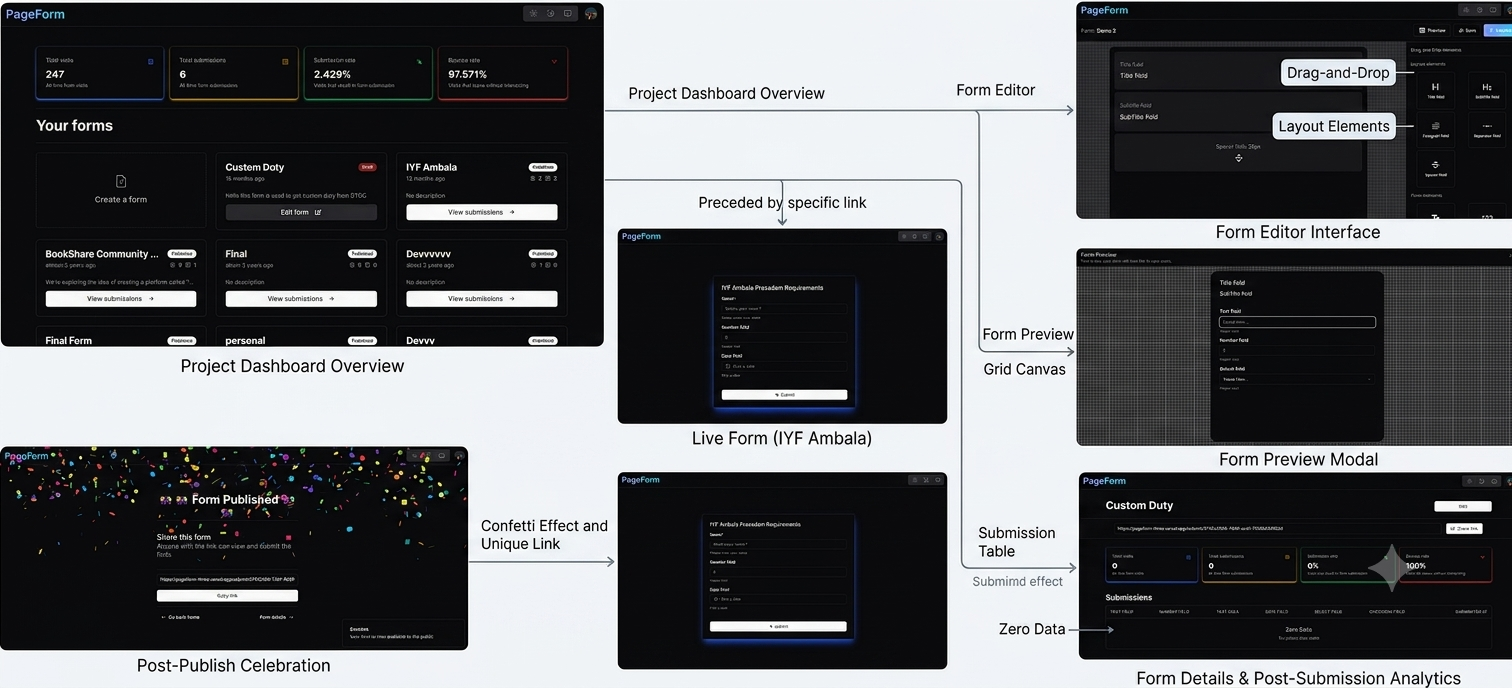
PageForm lets non-technical users create, publish, and share forms the way they would in Google Forms — but with full visual control. A field palette sits alongside a live canvas; users drag fields onto the canvas, reorder them, and configure each one's properties (required, label, placeholder, options) without touching code. Once published, the form is available at a shareable URL, and every response feeds a submission analytics dashboard showing completion and bounce rates.
Teams without developers routinely need forms — intake forms, event registration, feedback surveys — but off-the-shelf tools like Google Forms offer little visual or brand control, and custom-built forms require a developer for every new field or layout change. The goal was a builder flexible enough to produce genuinely custom-looking forms, while staying simple enough for a non-technical person to use unassisted.
Designing and building the entire product solo — the drag-and-drop builder engine, the per-field property system, the publish/share flow, the public form renderer, response collection, and the analytics dashboard.
Engineering challenges
Drag-and-Drop Builder Canvas
Users needed to drag field types from a palette onto a canvas, reorder existing fields, and see the form take shape live — without the interaction feeling laggy or fragile across different field counts.
Built the builder using dnd-kit, with the palette as a set of draggable sources and the canvas as a sortable droppable list. Field order is tracked as an explicit array so reordering is a simple array move rather than a DOM-position hack, keeping drag state and saved state in sync.
Per-Field Property System
Different field types — text, textarea, select, checkbox, radio, date — each need a different set of configurable properties (required, placeholder, options list, label), and the property panel had to adapt correctly to whichever field is selected.
Modeled each field as a typed schema object with a fixed base shape (id, type, label, required) plus a type-specific config block. The property panel renders form controls dynamically off that schema, so adding a new field type means defining its config shape once rather than hand-building a new panel.
Publishing and Rendering Arbitrary Saved Forms
A published form has to be reconstructed and rendered correctly for any respondent, purely from whatever schema was saved — including validation rules — without the builder and the public renderer drifting out of sync.
The publish action snapshots the field schema at that point in time and stores it against the public URL. A single shared renderer walks the schema array and outputs the corresponding input for each field type, applying the same validation rules (required, format) on both submission attempt and server-side check.
Submission and Bounce Rate Tracking
Measuring bounce rate requires knowing how many people viewed the form but never submitted it — not just counting completed submissions, which was all the initial version tracked.
Added lightweight view tracking on form load, separate from the submission record, keyed to a session identifier. Bounce rate is computed as views without a matching submission, and the analytics dashboard surfaces both submission count and bounce rate per form.
Architecture
What we built
Drag-and-Drop Field Builder
A field palette on one side, a live canvas on the other — fields are dragged in and reordered directly, powered by dnd-kit for smooth, reliable drag interactions.
Per-Field Property Panel
Every field on the canvas can be configured — required toggle, label text, placeholder, and option lists for choice-based fields — without leaving the builder.
Save and Publish Workflow
Forms are saved as drafts and published on demand. Publishing snapshots the current schema and generates a shareable public URL.
Public Form Sharing
Published forms are accessible to anyone via a simple link — no login required for respondents to fill and submit.
Submission Analytics Dashboard
Tracks submission counts and bounce rate per form, giving creators visibility into how many people viewed versus completed their form.
Built for Non-Technical Users
No code, no configuration files — the entire form creation flow is visual, aimed at people who would otherwise default to Google Forms.
Technical highlights
dnd-kit powered builder with separate droppable palette and sortable canvas zones
Typed, per-field-type schema driving both the property panel UI and the public form renderer from a single source of truth
Publish-time schema snapshotting so published forms remain stable even if the draft is edited afterward
View-vs-submission tracking to compute bounce rate rather than only counting completions
Shared validation logic reused between client-side submission and server-side checks
The impact
Drag & drop
Builder interaction model
Multiple
Configurable field types
Shareable
Public form URLs
Tracked
Submission and bounce rate
Business outcomes
No-Code Form Creation
Non-technical users can build and publish a fully custom-looking form without waiting on a developer for every field or layout change.
Visibility Into Form Performance
Creators see submission and bounce rates per form instead of only a raw response count, making it possible to tell whether a form is actually converting.
Lessons learned
A per-field-type schema pays off quickly — adding a new field type is a config definition, not a new UI to hand-build
Bounce rate is a genuinely different metric from submission count and needs its own tracking mechanism from day one, not bolted on later
Deferring response-screen and thank-you-screen customization was the right call for v1 — the builder and publish flow needed to be solid before adding post-submission polish